
Download MeslAI – Interactive AI Voice Conversations, Free Trial, Secure AI App
Overview of MeslAI: An Immersive AI Voice Conversation Platform
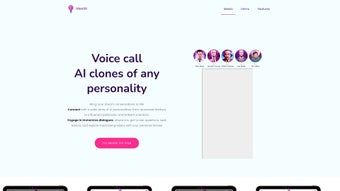
MeslAI is a cutting‑edge web‑based application that lets users speak with AI‑generated voice clones of famous personalities. Whether you want to hear a motivational pep talk from a celebrated leader, get a quick lesson from a renowned scientist, or simply enjoy a casual chat with a historical figure, MeslAI turns those ideas into audible reality. The service is built for entertainment, lifelong learning, and personal motivation, delivering a highly realistic auditory experience that feels like a genuine phone call.
New users receive one free call, allowing them to test the quality of the voice synthesis and the authenticity of the conversation without any financial commitment. After the trial, the platform follows a flexible weekly‑usage payment model, which can become pricey for heavy users but remains transparent and easy to understand. While the focus on voice‑only interaction creates an engaging environment, the lack of a text‑based fallback and occasional mismatches between the AI’s responses and the real personality’s known viewpoints may limit its appeal for some.
Nevertheless, MeslAI stands out as a pioneering tool that pushes the boundaries of AI‑driven communication, offering a unique blend of education, inspiration, and fun.
Key Features That Make MeslAI a Stand‑Out AI Voice Generator
- Authentic Voice Clones: Advanced text‑to‑speech technology reproduces the distinct timbre, cadence, and accent of each selected figure, creating a near‑realistic conversation experience.
- Wide Personality Library: From scientists and entrepreneurs to artists and political leaders, the platform continuously expands its roster, giving users a broad spectrum of voices to choose from.
- Topic‑Driven Dialogues: Users can steer the conversation by selecting topics such as leadership, science, creativity, or personal growth, ensuring relevance to their interests.
- Free Introductory Call: The first voice session is completely free, allowing users to evaluate quality, latency, and overall user experience before committing.
- Weekly Usage Billing: A flexible payment system charges based on minutes used each week, offering transparency for casual and power users alike.
- Secure Cloud Processing: All voice synthesis happens on encrypted servers, guaranteeing privacy and data protection for every user interaction.
- Responsive Web Interface: No downloads are required; the platform runs smoothly in modern browsers, making it accessible on any device with internet connectivity.
- Continuous Updates: Regular algorithm improvements and new voice additions keep the experience fresh and increasingly realistic.
Each feature is designed to maximize user engagement while maintaining a high level of authenticity. The voice cloning engine relies on deep neural networks trained on extensive audio datasets, ensuring that the speech output mirrors the nuances of the original speaker. Moreover, the topic‑driven dialogue system leverages natural language understanding to keep conversations coherent, even when users ask follow‑up questions or shift subjects mid‑call. The combination of these technologies provides a seamless, immersive experience that feels less like a scripted chatbot and more like a genuine conversation with a trusted mentor or historical icon.
Getting Started: Installation, Usage Guide, and Compatibility
Because MeslAI is a web application, there is no traditional installation process—simply navigate to the official website using a supported browser. The platform is optimized for the latest versions of Chrome, Edge, Safari, and Firefox. For the best audio quality, we recommend using a device with a reliable microphone and headphones or external speakers.
Step‑by‑Step Usage Instructions
- Create an Account: Click “Sign Up,” provide an email address, and set a secure password. You’ll receive a verification link to confirm your account.
- Select a Personality: Browse the voice library, read brief bios, and choose the figure you want to converse with.
- Choose a Topic: Pick from pre‑defined categories (e.g., “Leadership Tips,” “Science Q&A,” “Creative Inspiration”) or type a custom prompt.
- Start the Call: Click “Start Voice Session.” The system will synthesize the AI’s response in real time, and you can speak back through your microphone.
- Manage Usage: After each session, a usage meter displays the minutes consumed. When you approach the weekly limit, you’ll be prompted to purchase additional minutes or wait for the next billing cycle.
- End the Call: Press the “Hang Up” button to conclude the conversation. You can then rate the experience, which helps improve future interactions.
Supported Operating Systems: MeslAI works on Windows 10/11, macOS 11+ (Big Sur, Monterey, Ventura), Linux distributions with modern browsers, as well as Android 8+ and iOS 13+ devices. Because it runs in a browser, the experience is consistent across desktop, laptop, tablet, and smartphone platforms.
For mobile users, we recommend enabling microphone permissions in your device’s privacy settings before launching a session. If you encounter audio latency, try switching to a wired headset or updating your browser to the latest version. In rare cases where the AI voice sounds distorted, clearing the browser cache or restarting the session often resolves the issue. Overall, the setup process is straightforward, and the lack of a heavyweight client ensures quick access from virtually any internet‑connected device.
Pros, Cons, Frequently Asked Questions, and Final Verdict
Pros
- Highly realistic voice clones that enhance immersion.
- Free introductory call lowers the barrier to entry.
- Broad personality catalog catering to diverse interests.
- Transparent weekly usage billing model.
- No software download required – works in any modern browser.
- Secure, encrypted cloud processing protects user privacy.
- Regular updates introduce new voices and improve AI accuracy.
Cons
- Absence of a text‑based chat option limits accessibility for users in noisy environments.
- Weekly usage costs can add up for power users.
- Occasional mismatches between AI responses and the real personality’s known viewpoints.
- Reliance on a stable internet connection; poor bandwidth may cause audio glitches.
- Limited customization of AI personality beyond the preset voice library.
Frequently Asked Questions (FAQ)
Is the free trial really unlimited?
The free trial grants a single voice call of up to five minutes. It’s designed to showcase audio quality and conversation flow before you decide to purchase additional minutes.
Can I use MeslAI on my mobile phone?
Yes. MeslAI runs in mobile browsers on Android 8+ and iOS 13+. Just ensure you grant microphone access and use a stable internet connection for the best experience.
How is my data protected during voice calls?
All audio streams are encrypted with TLS 1.3 while in transit, and the servers store only minimal session metadata. No personal voice recordings are retained after the call ends.
What happens if I exceed my weekly minute allowance?
You’ll receive a prompt offering the option to purchase additional minutes at the standard rate, or you can wait until the next billing cycle when your allowance refreshes.
Are there plans to add text‑based chat in the future?
The development team has indicated that a text‑chat overlay is under consideration for a future update, based on user feedback requesting more flexibility in noisy environments.
Final Verdict
MeslAI delivers a novel and compelling way to interact with AI‑generated personalities through realistic voice conversations. Its free trial, extensive voice library, and browser‑based accessibility make it an attractive option for curious learners, motivational seekers, and anyone who enjoys immersive audio experiences. While the weekly pricing model may deter heavy users and the lack of a text fallback can be limiting, the overall quality of the voice synthesis and the platform’s commitment to privacy set it apart from generic text‑only chatbots. If you’re looking for an engaging, secure, and instantly accessible AI voice tool, MeslAI is well worth a try—especially with the complimentary introductory call.
MeslAI offers an impressive blend of realistic voice cloning and topic‑driven dialogue. The free trial showcases its strengths, though the cost structure could be better for power users. Overall, a solid 4‑star experience for anyone interested in AI‑powered auditory interaction.



.png)



